What's inside the content creator planner
- Creator Goals
- Brand Basics
- Content Ideas
- Monthly Calendar
- Weekly Content Plan
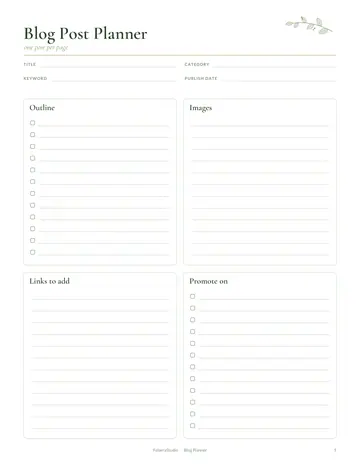
- Post Planner
- Video Planner
- Collaboration Tracker
- Analytics Tracker
- Hashtag Bank
- Creator Income
- Notes
See every page
All 16 pages of the US Letter version, exactly as they print. Tap a page to see it larger.
- 1. Cover
- 2. This Planner Belongs To
- 3. Contents
- 4. Creator Goals
- 5. Brand Basics
- 6. Content Ideas
- 7. Monthly Calendar
- 8. Weekly Content Plan
- 9. Post Planner
- 10. Video Planner
- 11. Collaboration Tracker
- 12. Analytics Tracker
- 13. Hashtag Bank
- 14. Creator Income
- 15. Notes
- 16. Thank you page
Who this content creator planner is for
This planner is for content creators on social media, video platforms and blogs. It suits new creators building a consistent habit and full-time creators managing collaborations and income. It brings ideas, schedules, analytics and earnings into one organized place. It also suits creators who post on several platforms and need one master plan.
How to use your content creator planner
Set creator goals and define your brand basics, such as niche, audience and style. Collect content ideas and plan them on the content calendar. Break down each week, plan individual posts and outline videos. Track collaborations with brands, record analytics to see what works, and build a hashtag bank. Log income from every source. Batch-create content on one or two days each week to save time. Review analytics monthly and make more of what your audience loves, and revisit your goals each quarter.
Formats included
A4 PDF
For printing in most of the world (210 × 297 mm).
US Letter PDF
For printing in the US and Canada (8.5 × 11 in).
Digital PDF
Hyperlinked tabs for tablets and PDF annotation apps.
Ready to start?
Free downloadContent Creator Planner questions
Is it for video creators?
Yes. There is a video planner page. Look for the "Video Planner" page in the 16-page content creator planner. Download it free, print only the pages you need and add more copies of any page later. Print the A4 or US Letter PDF as often as you need, or write in the digital version on a tablet.
Can I track income?
Yes. There is a creator income page. Look for the "Creator Income" page in the 16-page content creator planner. Download it free, print only the pages you need and add more copies of any page later. Print the A4 or US Letter PDF as often as you need, or write in the digital version on a tablet.
Does it include a hashtag bank?
Yes. Look for the "Hashtag Bank" page in the 16-page content creator planner. Print the A4 or US Letter PDF as often as you need, or write in the digital version on a tablet. Every page is undated, so you can start any day and reprint a page whenever it fills up.
Is the Content Creator Planner really free?
Yes, the Content Creator Planner is completely free for personal use. Download the 16-page PDF without an account or email address, print it at home as often as you like and share the page link with friends. FolarraStudio is free to use. In the future, a few clearly labeled ads may help keep it free.
What size is the Content Creator Planner?
The Content Creator Planner comes in A4 (210 x 297 mm) and US Letter (8.5 x 11 inches), plus a hyperlinked digital PDF for tablets. Choose the file that matches the paper in your printer and print at Actual size or 100%, so nothing is cut off. Both paper sizes have the same 16 pages.